Model series
Kelvinator KSV25HWH Servicing and the KSV and KSD HWH Series
The sticker inside your indoor unit carries more useful information than any brochure ever did. On a Kelvinator KSV25HWH it names the capacity, the series and the exact chassis on your wall.
Owners usually reach us after a display starts flashing, or after the airflow turns warm halfway through a long afternoon. So our first question never changes, which model string sits on that label.
The HWH systems have lived in Australian homes long enough that parts supply and service history now matter as much as the fault itself. That changes how a sensible repair gets planned.
This guide walks through a service visit from the first phone call to the final written record. Along the way it covers manuals, fault codes, resets and part availability across the whole series.
We hold no affiliation with the manufacturer, and we specialise in its equipment.
On this page
- Start With the Rating Label Rather Than Memory
- Finding the Right Kelvinator KSV25HWH Manual
- What We Ask Before a Kelvinator KSV25HWH Service Visit
- Step by Step Through a Service Visit
- What Happens After Our Technician Leaves
- Parts Supply on a Series That Has Aged
- Fault Codes Across the KSV and KSD HWH Range
- What Owners Mean When They Say It Is Not Working
- What Can Go Wrong on a Service Call
- How to Prepare Before the Technician Arrives
- Where We Work on HWH Series Systems
- Reviews, Specifications and Repair Value
- Common Questions About the KSV and KSD HWH Series
- Keeping an Older HWH Series System Healthy
Start With the Rating Label Rather Than Memory
Most owners remember the brand and the room it cools, though not the model string. However a technician needs that string before touching a spanner.
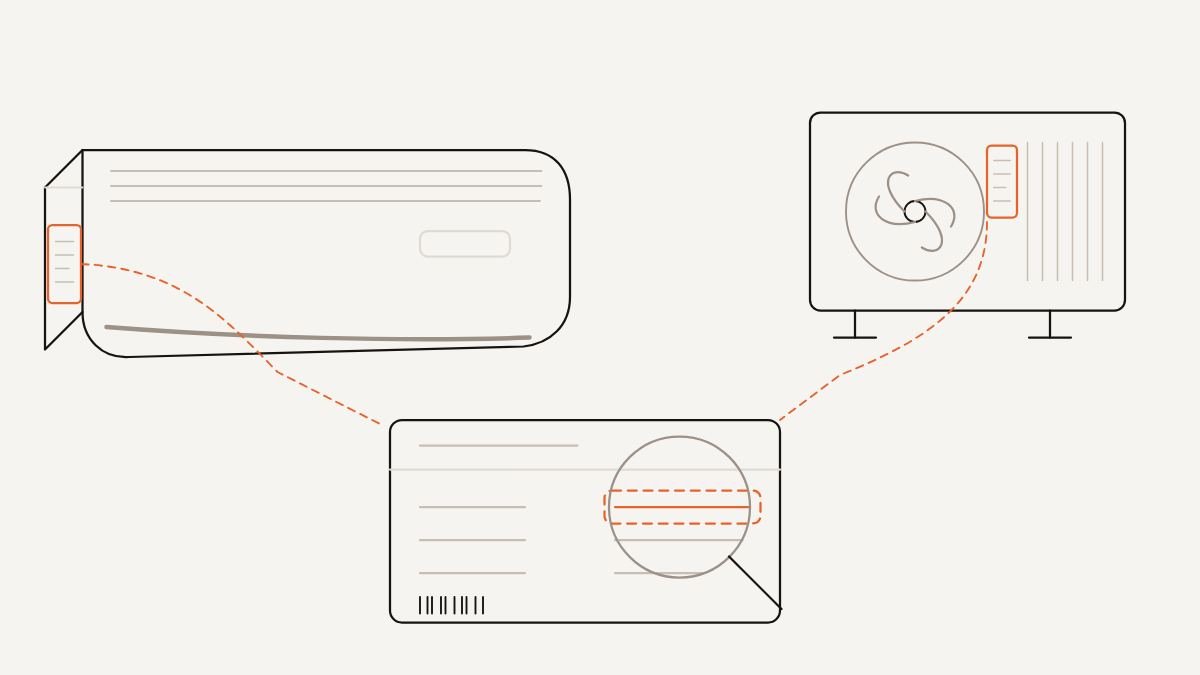
The rating label answers it in seconds. It also shows whether the indoor unit and the outdoor unit still work as a matched pair.
Here is what a label on a HWH series system usually carries.
Read those values from your own label rather than from a forum post. Two units that look identical on the wall can carry very different internals.
- The indoor model string, which begins with KSV or KSD.
- A serial number that identifies the production batch.
- The electrical supply rating for that particular unit.
- Refrigerant type, stamped near the pipe connections.
- A factory charge weight for the outdoor unit.
Where the Label Hides on the Indoor Unit
On a wall mounted indoor unit, lift the front panel until it clicks and hold it open. The label usually sits on the right hand side of the chassis, behind the filter.
Some units carry a second label underneath, near the drain outlet. So check both spots before deciding the sticker has faded beyond reading.
Reading the Capacity Digits and the HWH Suffix
The digits in the middle of the string relate to nominal cooling capacity. A larger number means a larger unit, so a Kelvinator KSV50HWH suits a bigger room than a Kelvinator KSV25HWH does.
The letters matter just as much, because they identify the indoor style and the series generation. Read the whole string as a set rather than guessing from the digits alone.
For the exact rating in kilowatts, read the figures printed on your own label. We never quote a capacity from memory, and neither should any technician quoting you.
Why the Outdoor Unit Carries Its Own Label
The outdoor unit holds a separate model string and its own serial number. Because indoor and outdoor units get swapped over the years, the two do not always match.
A mismatched pair still runs, yet it can behave oddly under heavy load. So we record both strings before ordering any part at all.
The outdoor label also names the refrigerant and the factory charge. Those two details shape how we handle a leak repair.
Finding the Right Kelvinator KSV25HWH Manual
Owners often end up with a Kelvinator KSV25HWH manual that was written for a different series. The layout looks familiar, so the mistake hides until a code fails to match.
Manuals split into two kinds. There is the owner handbook that shipped in the box, and the installation manual written for trade use.
The handbook covers the remote, the modes and the filters. Meanwhile the trade manual carries the wiring diagram, the sensor resistance tables and the full fault code list.
If you want a Kelvinator KSV35HWH manual or a Kelvinator KSV50HWH manual, match the model string letter for letter. A Kelvinator KSD50HWH manual will not describe the same indoor chassis.
Owners of larger systems hunt for a Kelvinator KSV71HWH manual and find only a general document. That is normal, because one Kelvinator KSV HWH series manual often spans several capacities at once.
What to Do When No Manual Turns Up
Print copies vanish, and websites retire older documents without warning. Still, the information you actually need lives inside the unit and on its label.
Our technicians carry service data for many older Kelvinator models. So a missing download does not stop a diagnosis from going ahead.
Send us a clear photo of the label and of the flashing display. Then we can explain the code before anyone drives out to you.
What We Ask Before a Kelvinator KSV25HWH Service Visit
A good service call really starts on the phone. Three details shape everything that follows, and all three sit within arm reach of the unit.
Because we gather them early, our technician arrives with the likely parts already on board. That single habit prevents a second visit more often than anything else.
The Model and Serial Numbers
We ask for the indoor string, the outdoor string and both serial numbers. Those numbers tell us which board revision and which sensor set your system uses.
A Kelvinator KSV50HWH service call and a Kelvinator KSD50HWH repair can need entirely different parts. The digits match, yet the chassis does not.
If the label has faded away, tell us and we will work from photographs of the unit instead. Other markers inside narrow the identification down.
The Code on the Display
Write down exactly what the display shows, including any flashing sequence. Count the flashes carefully if the unit has no numeric display.
Kelvinator KSV25HWH error codes and Kelvinator KSV35HWH fault codes follow the same broad logic across the range. Still, small differences exist between generations.
Tell us whether the code appears immediately or after twenty minutes of running. That timing alone narrows the likely cause dramatically.
The Story Behind the Fault
Faults have a history, and that history matters. So we ask when the symptom started and what else changed around the same time.
Recent storms, a power outage, new ceiling insulation or a room extension all count. Because these change the load on the system, they change the fault picture too.
Two households can report an identical symptom for completely different reasons. Therefore the background detail earns its place in the conversation.
Step by Step Through a Service Visit
Every visit follows the same backbone, whether the unit cools a bedroom or a large living area. Here is the order our technicians work through.
That order matters more than it looks. Because electrical faults imitate refrigeration faults, testing out of sequence sends a diagnosis down the wrong road.
Confirm the model and serial numbers against both rating labels.
Read any stored code before touching the power supply.
Check the isolator, the circuit breaker and the terminal connections.
Run the system and watch the startup sequence from cold.
Measure supply voltage and compressor current under load.
Remove and inspect the indoor filters and the barrel fan.
Compare indoor coil temperature against return air temperature.
Inspect the outdoor coil, the fan motor and the contactor.
Test sensor resistance values against the service data.
Check the drain line for blockage and confirm the fall.
Clear the code and verify the unit holds through a full cycle.
Why the Electrical Checks Come First
A loose terminal can mimic a failing compressor almost perfectly. Both produce a unit that trips out under load and restarts a few minutes later.
So we tighten and test before we ever gauge up. Otherwise we risk condemning a healthy compressor over a screw that needed a quarter turn.
What We Measure on the Refrigeration Side
When the electrical side checks out, we move to pressures and temperatures. Together those two reveal whether the charge and the airflow remain healthy.
A Kelvinator KSV25HWH not cooling on a hot day can point to a leak, a blocked coil or a tired fan. The numbers separate those causes quickly.
A Kelvinator KSV35HWH not cooling late in the afternoon behaves the same way. So we test under real load rather than in the cool of morning.
Talk it through with a technician
Tell us the model and what the unit is doing, and we will bring the right parts to the first visit.
What Happens After Our Technician Leaves
The visit does not end when the van pulls away from the kerb. There is usually a short window where the system proves the repair for itself.
We ask owners to run the unit normally for a few days and watch for the old symptom. If it returns, we want to hear about it quickly.
When a Part Has to Come on Order
Older series sometimes need a component that no local branch keeps in stock. So the technician leaves the system in the safest working state available.
Sometimes that means running in fan mode only. Other times it means switching the system off entirely until the part lands.
We explain what the wait involves and which repair paths remain open. You can also read about what drives the cost of a repair before you decide.
The Record That Helps Next Time
Every visit produces a record of codes found, readings taken and work completed. Keep it with the manual and your label photo.
That small file turns a vague complaint into a clear pattern over several years. As a result, the next diagnosis takes far less time.
Parts Supply on a Series That Has Aged
Once a series has lived in homes for a while, part supply becomes the real question. The fault might be simple, yet the component decides the outcome.
Some items remain easy to source. Others depend on what wholesalers still hold, and on whether a later component fits the same mounting.
Boards, Sensors and Fan Motors
Sensors and thermistors stay widely available, because they remain simple parts shared across many models. A sensor fault usually turns into a same visit fix.
Control boards prove harder. When the original board disappears from supply, we look at whether a superseded board carries the same plug layout.
Indoor fan motors sit somewhere in between. Sometimes a direct replacement exists, and sometimes the honest answer is that a Kelvinator KSD50HWH repair stops making sense.
Remotes, Filters and Cosmetic Parts
A lost handset rarely ends a system. Universal handsets cover most Kelvinator KSV25HWH remote functions, although a few advanced modes drop away.
Filters remain the easiest part of all. Kelvinator KSV25HWH filter cleaning needs nothing beyond warm water, a soft brush and a shaded dry.
Front panels and louvre blades cause the most trouble. Because they are bulky and model specific, suppliers stop holding them fairly early.
Fault Codes Across the KSV and KSD HWH Range
Codes on this range follow a family pattern. Letters group the fault type, and the digit narrows it to a component or a circuit.
Owners describe the problem in model specific ways, though the underlying logic stays constant.
Each code points at a circuit rather than a verdict. So the code narrows the search, and the meter finishes it.
- Kelvinator KSV25HWH error codes appear on the indoor display as a short character sequence.
- On that same panel, Kelvinator KSV35HWH error codes follow one grouping.
- Anyone comparing Kelvinator KSV50HWH error codes and Kelvinator KSD50HWH error codes finds most entries shared.
- Larger systems add a little, so Kelvinator KSV71HWH error codes cover extra outdoor faults.
- A Kelvinator KSV HWH series error codes list therefore spans several capacities at once.
Reading a Flashing Light Pattern
Not every indoor unit shows characters. Some report the fault through the timer light, the run light and the defrost light instead.
Count the flashes in one burst, then wait through the pause and count the second burst. Two numbers usually emerge, and together they form the code.
Film it on your phone if the sequence moves too quickly. Then we can read it frame by frame without any guesswork.
When a Reset Is the Wrong Move
A Kelvinator KSV25HWH reset clears the stored code and starts the board fresh. That helps after a power event, and it destroys evidence after a genuine fault.
So write the code down first, every single time. A Kelvinator KSV35HWH reset performed before reading the display throws away the best clue you had.
If the same code returns within a day, stop resetting the unit. The board keeps protecting your system for a reason.
What Owners Mean When They Say It Is Not Working
That phrase covers at least four very different situations. Sorting them at the booking stage speeds up everything afterwards.
A Kelvinator KSV25HWH not working can mean no lights, no beep and no fan movement at all. That points at the power supply, the isolator or the indoor board.
A Kelvinator KSV35HWH not working might mean the fan runs while the air stays at room temperature. Therefore the compressor or the refrigerant charge becomes the suspect.
A Kelvinator KSV50HWH not working sometimes means it starts, runs a while and then shuts down. That pattern suggests a protection trip rather than a dead component.
A Kelvinator KSD50HWH not working in heating, while cooling still performs, points at the reversing valve or a defrost sensor. So the symptom detail changes our whole approach.
Tell us which of those pictures matches your unit. Then our technician packs the van accordingly.
What Can Go Wrong on a Service Call
Most visits run smoothly, although a handful of situations slow things down. Knowing them in advance removes nearly all of the friction.
Here are the ones we meet most on older systems.
We work around every one of these. Still, the visit runs faster when you mention them at the booking stage.
- An intermittent fault that clears itself before the technician arrives.
- A model string that turns out to belong to another series entirely.
- An outdoor unit on a roof or bracket with no safe access.
- A previous repair that left non standard wiring behind it.
- Delay on a component that no longer ships locally.
- Pets or furniture blocking the return air path during testing.
The Fault That Disappears
Intermittent faults frustrate everybody involved. Because the unit behaves perfectly on cue, our technician has nothing to measure.
So we log conditions instead. A note of outdoor temperature, run time and mode at each failure slowly builds a pattern.
How to Prepare Before the Technician Arrives
Ten minutes of preparation shortens most visits noticeably. It also improves the diagnosis, because more of the hour goes into testing.
Work through these points before your appointment.
That last step matters more than it sounds. A unit already warm and running shows its true behaviour immediately.
- Photograph the indoor and outdoor rating labels.
- Note the code shown and how long the unit ran beforehand.
- Clear furniture and stored items from around the indoor unit.
- Unlock any side gate and secure pets away from the outdoor unit.
- Find the switchboard and identify the relevant circuit breaker.
- Gather the remote, spare batteries and any paperwork you hold.
- Run the system for a while beforehand, if it still runs.
Where We Work on HWH Series Systems
Our technicians service Kelvinator split systems in houses, apartments and small offices across Australian suburbs and regional towns. Wall mounted indoor units make up most of that work.
We also handle the neighbouring ranges, so a mixed household causes no difficulty. Many homes run one system from the KSV and KSD HRH series alongside a newer wall unit.
If a second system belongs to the KSD HWJ wall mounted inverter range, we look at both in one visit. The same goes for window and wall units in the KWH HRF range.
Reviews, Specifications and Repair Value
Owners researching a Kelvinator KSV25HWH review want to know whether the unit deserves keeping. That is a fair question after several summers of hard service.
Reviews describe how a model behaved for somebody else, in another home, on another installation. So read them for patterns rather than for verdicts.
A Kelvinator KSV35HWH review complaining about noise may really describe a loose bracket. Meanwhile a Kelvinator KSV HWH series review praising quiet running may describe a careful installer.
The same caution applies to a Kelvinator KSV HWH series problems thread. A Kelvinator KSV50HWH problems discussion usually repeats three complaints, and those repeats carry the real signal.
Specifications and Cost Questions
Owners want Kelvinator KSV25HWH specs set out in one authoritative table. However the only reliable source stays the label on your own wall.
Capacity, electrical rating, refrigerant type and charge weight all sit there together. Read them from the unit, then compare against whatever you find online.
A Kelvinator KSV25HWH price usually means two different things. Some owners want a replacement unit, and others want the likely cost of a repair.
When Repair Stops Making Sense
Age alone does not condemn a system. A well maintained unit with a clean coil and a healthy compressor keeps going for years.
The turning point arrives when a major component fails and part supply has thinned. Then the repair cost climbs toward the value of a new installation.
We hand you the readings and the options rather than a verdict. You decide, and we tell you plainly what we would do in your position.
Common Questions About the KSV and KSD HWH Series
Where do I find the Kelvinator KSV25HWH manual for my exact unit?
Match the full model string from the rating label, letter for letter and digit for digit. One series document often covers several capacities together.
If the download you find does not list your string, treat it as a guide only. Send us the label photo and we will confirm what applies.
What do Kelvinator KSV35HWH error codes actually tell me?
They name the circuit the board stopped trusting, rather than the part that failed. For example a sensor code can mean a faulty sensor, a damaged lead or a loose connector.
So treat the code as your starting point. A meter then confirms which of those three it really is.
Why is my Kelvinator KSV25HWH not cooling on hot afternoons?
Heat load rises exactly when the system loses margin, so any weakness surfaces then. Blocked filters, a dirty outdoor coil and low refrigerant all behave this way.
Clean the filters first, because that costs nothing at all. If cooling still fades after an hour of running, the fault sits deeper.
Can I still get parts for a Kelvinator KSV50HWH repair?
Sensors, capacitors and contactors remain broadly available across this range. Boards, motors and cosmetic panels depend on what wholesalers still hold.
We check availability before quoting, so nobody pays for a diagnosis leading nowhere. If a part has truly gone, we say so plainly.
How do I do a Kelvinator KSV25HWH reset properly?
Photograph the display first, then switch the unit off at the isolator or the breaker. Leave it off for a couple of minutes before restoring power.
That clears the stored state and lets the board start again. However a code returning quickly needs diagnosis rather than another reset.
What does Kelvinator KSV25HWH wifi setup involve?
Wifi control depends on whether your indoor unit has a module fitted or an adaptor port available. Many units in this series need an accessory rather than a settings change.
Check the label and the indoor unit before buying anything at all. Our technician can confirm what your particular system supports.
How often should Kelvinator KSV25HWH filter cleaning happen?
Every few weeks through the heavy running season, and at least twice a year otherwise. Homes with pets or nearby roadworks need it more frequently.
Wash the filters in warm water, then dry them in shade before refitting. A damp filter breeds odour inside the indoor unit.
Why is a Kelvinator KSV71HWH not working after a blackout?
Start at the switchboard, because a tripped breaker explains most total failures. Then check the isolator sitting beside the outdoor unit.
If power reaches the unit and nothing responds, the board or the transformer may have taken a hit. That situation needs a technician with a meter.
Keeping an Older HWH Series System Healthy
These systems reward attention. Clean filters, a clear outdoor coil and one annual check keep most of them running well past the point owners expect.
When something does go wrong, the label and the code do most of the diagnostic work for you. So photograph both before you call anybody.
If you would like our technicians to look at yours, you can book a service visit and quote the model string. We will arrive with the right parts and the right service data.
Browse the site
Book a technician
Speak to a qualified technician who works on Kelvinator systems
Call 1300 495 033 and tell us the model and the fault, or book online and we will come back to you.